Quality Management and Workflow Plugin
Workflow Engine for Quality Management
Description
QMPlugin provides a way to manage the quality of content created in a wiki. While Foswiki itself already provides
efficient means to control access, content sometimes needs to be reviewed and approved while evolving as part
of a quality management process. This process is encoded in a kind of workflow where contributors
play different roles, e.g. being an idea creator, elaborator, maintainer, reviewer, approver, or interested party.
The actual workflow varies in most real world scenarios and can be customized to exactly your needs. Of course
multiple workflows may exist for different kind of content being managed in different ways.
Similar plugins have been implemented before:
WorkflowPlugin,
ApprovalPlugin.
QMPlugin is a completely new and clean implementation. Key differences are:
- strictly object oriented
- parallel approvals: multiple persons may have to sign off to a certain degree
- consistent access control: purely rely on Foswiki's access control mechanism to grant access to documents; no unapproved content is disclosed by any means, such as other plugins accessing or indexing the content
- approval rights: maintain approval rights separate to pure change rights to a topic, so people can approve content yet have no other rights to change it
- roles: a role concept eases workflow definitions a lot
- visual workflows: workflows are visualized using GraphvizPlugin
- workflow history: improved storage format of the workflow history of a topic; backwards compatible with WorkflowPlugin
- commands: implement an open command handling mechanism that can be customized and extended by other plugins (commands are executed during transitions)
- fork-merge: approved documents may be forked into a copy while working on a new revision; the previously approved content is still accessible while the forked version is work in progress; the newly approved revision may then be merged back onto its origin where it was initially forked from
- conditions: additional checks may be put in place to limit or extend the set of edges that may be transitioned at a certain point in the workflow (e.g. when estimated costs are below a certain threshold can a product be acquired directly without extra approval by a responsible person)
Terminology
The key concepts are:
- net
- a net consists of nodes and directed edges connecting them; a net may be traversed by switching from one node to the next as long as they are connected by an edge and all conditions are met
- node
- identifies a set of properties at this position in the net
- edge
- connects two nodes in the net: a source node with a target node (we only consider directed graphs here)
- workflow
- a kind of net that defines a progression of steps that comprise a process involving one or more persons
- role
- one or more persons or groups that have specific responsibilities while acting on the workflow process
- state
- a document can be in a certain state by refering to a current node in the workflow; the state inherits properties from the current node
- transition
- a document may change its state by traversing one of the outgoung edges of the current node
- activation
- an edge is active when a document is in the state of the source node and all of the edge's constraints are met
- acl
- access control lists describe the set of persons or roles that are allowed to carry out a specific action
- parallel approval
- a document state change needs to be approved by multiple persons; the number of required approvals is specified by a sign-off percentage
A node in a workflow has got a set of properties which then affect the document when it reaches this state:
-
id: (required) unique identifier among all nodes of a workflow (e.g. draft, approved, submitted, ...)
-
title: (optional) display title (e.g. Draft, Approved, Waiting for Approval, ...)
-
message: (optional) verbose description (e.g. “This document is being worked on”, ''This document is waiting for approval.'', “This document is approved.'', ...)
-
allowEdit: (optional) acl controling edit rights on the document
-
allowView: (optional) acl controling view rights
-
class: (optional) a css class to be added to the status box being rendered when the document is in that state
-
viewTemplate: (optional) the VIEW_TEMPLATE setting that a topic inherits being in that state
-
editTemplate: (optional) the EDIT_TEMPLATE setting that a topic inherits being in that state
-
printTemplate: (optional) the PRINT_TEMPLATE setting that a topic inherits being in that state
The first node in the list of nodes is the “default node” where the process starts. Any document that is under workflow control but has no state assigned to it
yet is in this state by definition. A node
id may be marked with an asterisk, e.g.
released*. This node is the “approval node” depicting those nodes that
specify a kind of final state of the document. Alternatively, you may just use the string “approved” (or any other custom id specified in the
preference setting
QMPLUGIN_APPROVAL) to define an approval node id.
An edge in a workflow defines the kind of actions a person may perform from a source to a target node:
-
from: (required) id of the source node (or incoming node) of the edge
-
action: (optional) id of the action performed on the source node, defaults to to
-
title: (optional) display title of the action to be performed, defaults to =action
-
to: (required) id of the target node (or outgoing node)
-
allowed: (optional) acl controling the set of persons that are allowed to transition the state of the document
-
enabled: (optional) a boolean constraint implemented as a TML expression to control if the edge's is allowed to be traversed
-
notify: (optional) list of roles that are notified when the edge is transitioned
-
mailTemplate: (optional) name of an email template to be used in a notification, defaults to QMPluginNotifyTemplate
-
command: (optional) list of commands that are executed when this edge is traversed; see the list below for a description of known actions and their parameters
-
signOff: (optional) minimum percentage of participants required to transition the state, default to 0%; as long as the sign-off is not reached yet will the document remain in the current state; only when all participants (specified in the “allowed” property) performed the same action on the node will the transition be carried out and the document reaches the target state
A role in a workflow bundles the following properties:
-
id: (required) unique identifier among all roles of a workflow (e.g. Creator, Approver, Interested Party, ...)
-
members: (required) list of persons, wiki groups or other roles
-
description: (optional) a text to describe what this role is about
-
notify: (optional) list of email addresses to be notified when required; if undefined will email addresses be extracted fom the wiki account of the listed persons; notification will be suppressed if defined as nobody.
Note that all properties except
id may contain TML expressions that are expanded in the context of the controlled document.
For example the following defines a “Creator” role by extracting the the author of the initial revision of a document.
A role
id may be marked with an asterisk. This role is the “admin role” that has got special rights with regards to the workflow.
I.e. admins may cancel an ongoing parallel approval; an admin can switch all transitions without granting explicit permission.
By default, the admin role is named “Admin”. Or any other custom id can be specified in the preference
setting
QMPLUGIN_ADMIN.
| *ID* | *Members* | *Description* |
| Creator  | %IF{"istopic '%WEB%.%TOPIC%'" then="$percntREVINFO{\"$username\" rev=\"1\"}$percnt" else="%USERNAME%"}% | %TRANSLATE{"Person that created this topic."}% |
| Admin* | WorkflowAdminGroup | %TRANSLATE{"People with admin rights on the workflow."}% |
Usage
Before you can establish a workflow for a document you need to define the workflow. A minimal workflow defines a set of nodes and edges only:
---++ Nodes
| *ID*      |
| created   |
| inprogress |
| submitted |
| approved*  |
| rejected  |

---++ Edges
| *From*    | *To*      |
| created   | submitted |
| inprogress | submitted |
| submitted | approved  |
| submitted | rejected  |
| approved  | inprogress |
| rejected  | inprogress |
In this example no roles are defined, nor any access control on nodes or edges. A full-featured workflow can be outlined in the following example:
---++ Roles
| *ID*     | *Members*                          | *Description* | *Notify* |
| Creator  | %IF{"istopic '%WEB%.%TOPIC%'" then="$percntREVINFO{\"$username\" rev=\"1\"}$percnt" else="%USERNAME%"}% | %TRANSLATE{"Person that created this topic."}% | |
| Approver | %FORMFIELD{"ResponsiblePersons"}%  | %TRANSLATE{"People to approve this topic."}% |  |
| Admin*   | AdminGroup                         | %TRANSLATE{"People with admin rights on the workflow."}% |  |

---++ Nodes
| *ID*       | *Title*              | *Allow Edit* | *Allow View*      | *Message* | *Attributes* | *View Template* |
| created    | Created              | Creator      | Creator           | %TRANSLATE{"This document has just been created."}% | fillcolor="#ffb3b2", penwidth=0 | |
| inprogress | In Progress          | Creator      | Creator           | %TRANSLATE{"This document is being worked on."}% | | |
| submitted  | Waiting for Approval | Nobody       | Creator, Approver | %BLUE%%TRANSLATE{"This document is waiting for approval."}%%ENDCOLOR% | | |
| approved*  | Approved             | Nobody       |                   | %GREEN%%TRANSLATE{"This document is approved."}%%ENDCOLOR% | | |
| rejected   | Rejected             | Creator      | Creator, Approver | %RED%%TRANSLATE{"Approval for this document has been rejected."}%%ENDCOLOR% | | |

---++ Edges
| *From*     | *Action*          | *Icon*             | *Title*          | *To*       | *Allowed* | *Notify* | *Enabled* | *Trigger* | *Command* | *Sign Off* | *Attributes* | *Rank* | *Mail Template* |
| created    | request approval  | fa-question-circle | Request approval | submitted  | Creator   | Approver | | | | | penwidth=3 | | |
| inprogress | request approval  | fa-question-circle | Request approval | submitted  | Creator   | Approver | | | | | penwidth=3 | | |
| submitted  | approve           | fa-thumbs-o-up     | Approve          | approved   | Approver  | | | | merge | 100% | penwidth=3 | | |
| submitted  | reject            | fa-thumbs-o-down   | Reject           | rejected   | Approver  | Creator | | | | | | | |
| approved   | start revision    | fa-pencil          | Start revision   | inprogress | Approver, Admin | Creator | | | fork | | penwidth=3 | | |
| rejected   | resume            | fa-pencil          | Resume           | inprogress | Creator   | | | | | | | | |
A workflow consists of at least two tables to define nodes and edges. A third table may be present optionally defining roles.
Note that the properties
ID,
From,
Action and
To are used internally and must stay constant, whereas the
Title and
Message properties may be used
more freely such as rendering a multi-lingual display label that varies based on the user's language settings, given
MultiLingualPlugin
is installed.
The resulting net can be visualized using the
%QMGRAPH% macro in case you also installed the
GraphvizPlugin.
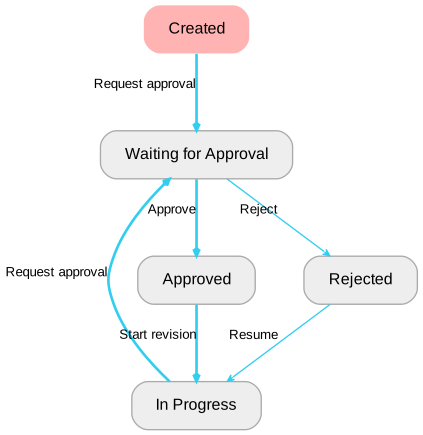
Once this workflow definition is stored in a topic, say
SimpleApprovalWorkflow, it may be added to a topic to start the workflow:
%QMSTATE{workflow="SimpleApprovalWorkflow"}%
Custom Properties
| ID |
Class |
Foo |
Bar |
| created |
foswikiInfoMessage |
|
lorem |
| inprogress |
foswikiWarningMessage |
0 |
ipsum |
| submitted |
foswikiWarningMessage |
$foo |
|
| approved* |
foswikiSuccessMessage |
1 |
|
| rejected |
foswikiErrorMessage |
$foo |
5 |
Nodes and edges may have custom properties besides those outlined above. These are defined in additional columns to the roles, nodes or edges table.
Custom node properties will be recomputed and stored into the state of a document when entering this node.
The custom properties "Class", "Foo" and "Bar" may be used when rendering a QMSTATE:
%QMSTATE{
  format="<div class='$class'>
              $message
              Foo has got the value $foo, Bar is $bar
          </div>"
}%
In this example messages will be styled using a css class to control the way messages are displayed.
The values for
$foo and
$bar will be updated as the document passes through these nodes. A custom property might
reference its previous value or reference another one, as shown in
rejected.
Transition Commands
An edge may be annotated with actions in the "Command" column of the edges table. These actions are executed whenever the edge is transitioned. For example a fork and/or copy operation is executed, a preference setting is set.
There is a fixed set of available commands, that can be extended by other plugins using the
registerCommandHandler() API.
Note that multiple commands may be triggered listing them comma-separated in the "Command" column of the edges table.
copy()
copy a topic to a different location
Parameters:
-
topic="<targetTopic>"
-
web="<targetWeb>"
Examples:
-
copy(web="Public")
-
copy(topic="SomeOtherTopic")
-
copy(topic="%TOPIC%Published")
createTopic()
Parameters:
-
topic="<newTopic>" or "<newTopic": topic name to be created, can be a full web.topic
-
web="<newWeb>: web to create the topic in, defaults to the current state's web
-
overwrite="on/off": boolean switch to overwrite any existing topic, defaults to off thus warning when the same topic is about to be created again
-
template="<templateTopic>": topic name of a template topic to be used
-
form="<formTopic>": topic name of a template topic to be used
-
parent="<parentTopic>"
-
redirect="on/off": boolean switch to redirect to the newly created topic
-
redirectto="...": web.topic name to redirect to after the topic has been created, can be a full http url as well
-
<fieldName="..." value for the given field
createWeb()
see
WebCreatorPlugin
delete named meta data of the current topic
Parameters:
Examples:
fork()
create a copy of the current topic and append
suffix to its name; then redirect to it
Parameters:
set a formfield in a target topic (default current topic)
Parameters:
-
topic="<targetTopic>"
-
"<fieldName>"
-
name="<fieldName>"
-
value="<...>"
Examples:
-
formfield("TopicTitle" value="%FORMFIELD{"TopicTitle"}% (published)" topic="QMPluginPublished")
merge()
reverts a previous
fork operation
move()
move the current or specified topic
Parameters:
-
topic="<topic>" (default current topic)
-
to="<web-topic>" target web-topic
-
totopic="<topic>" target topic
-
toweb="<web>" target web
-
redirect="<web-topic>" where to redirect to after the topic has been renamed
-
overwrite="on/off" boolean switch to overwrite a topic already existing, (default off)
pref()
set a preference value in a target topic (default current topic), a preference is removed when assigning the empty string
Parameters:
-
topic="<targetTopic>"
-
"<prefName>"
-
name="<prefName>"
-
value="<...>"
Examples:
-
pref("token" value="1")
-
pref("token" value="")
-
pref("counter" value="%CALCULATE{"$EVAL(%counter{default="0"}%+1)"}%")
rest()
make a REST call
Parameters:
-
<id>: ID of a predefined REST configuration = <key>=<value>: optional key-value pairs to be patched into the REST's url parameters, http header or body content
A REST handler is defined as part of the QMPlugin configuration. For example:
$Foswiki::cfg{QMPlugin}{RestConfig} = {
  notifyUser => {
    url => 'https://mycompany.com/bin/view/Applications/LocalApps/NotifyUser',
    method => "GET",
    params => {
      section => "test",
      skin => "text",
      user => "%val%",
    },
  },
  postMessage => {
    url => 'https://mycompany.com/bin/view/Applications/LocalApps/PostMessage',
    method => "POST",
    body => {
      foo => "%val%",
      bar => "%val%",
      baz => "%val%",
    },
  }
};
This will enable commands
rest("notifyUser" user="WikiGuest") and
rest("postMessage" foo="abc" bar="def" baz="ghi") added to your workflow.
Note that the response of the REST call will be stored in a specific prefernce setting to be processed further by other commands of the transition.
In the above example configuration the results of the
notifyUser call will be stored in
%notifyUser_response%
Likewise, the response of the
postMessage handler will be stored in
%postMessage_response%
To store this value use a command sequence like this:
rest("postMessage" foo="val1" bar="val2" baz="var3"), pref("result" value="%postMessage_response%") |
You may of course use the
formfield() command instead of the
pref() to store the response into a formfield instead of a preference variable.
trash()
move a source topic (default current topic) to the trash
Parameters:
-
"<sourceTopic>
-
topic="<sourceTopic>"
Examples:
-
trash(topic="%TOPIC%Published")
QMSTATE
This macro renders information about a topic in a specific workflow state.
| Parameter |
Description |
Default |
"..." or topic |
topic to render the workflow state for |
current topic |
rev |
version of the topic |
rev urlparam if present, otherwise latest revision |
ignoreerror |
boolean switch to disable any possible error message that might occur |
off |
warn |
alernative to ignoreerror |
on |
format |
format string |
value of template |
template |
template being used to render the workflow state; this will only be used when no manual format string has been specified |
qm::state |
workflow |
workflow definition |
current topic's workflow |
reviewheader |
header string to be prepended to all reviews |
qm::review::header |
reviewformat |
format string to render a review in the list of available reviews |
qm::review::format |
reviewfooter |
footer string appended to the reviews being rendered |
qm::review::footer |
reviewlimit |
maximum number of reviews being rendered |
0 |
reviewreverse |
boolean flag indicating the sorting direction of all reviews |
0 |
reviewseparator |
separator string put between formatted reviews |
|
reviewskip |
used for paging through a list of reviews offset into that list |
|
The
format string as well as the
template content may use the following variables:
-
$action: last action that lead to the current state
-
$actionTitle: title of the last action that lead to the current state
-
$actions: list of possible actions of outgoing edges from the given state
-
$edges: list of possible transitions from the given state
-
$nodes: list of possible target nodes from the given state to transition to
-
$adminRole: id of the admin role
-
$approvalID: id of node flag as being the approval node
-
$approvalIDs: ids of nodes flag as being the approval node
-
$approvalRev: most recently approved revision
-
$approvalTime: time in epoch seconds of the most recent approval
-
$approvalDuration: time since since the last approval
-
$author: user that performed the last action
-
$comment: comment provided by performing the last action
-
$comments: all comments of people participating in a parallel approval
-
$date: date of the recent change of the state
-
$datetime: date-time of the recent change
-
$defaultNode: starting node in the workflow net
-
$duration: time since the last change in seconds
-
$emails: list of emails to notify when this state has been reached
-
$epoch: epoch seconds of the recent change
-
$hasComments: boolean flag indicating the existence of comments
-
$hasPending: boolean flag indicating the existence of pending reviews in a parallel approval
-
$id or $state: current state id
-
$isAdmin: boolean indicating whether the current user is an admin
-
$notify: list of people to notify when this state has been reached
-
$numActions: number of next actions that the current user can perform on the current state
-
$numEdges: number of possible transitions that the current user can follow from the current state
-
$numReviews: number of reviews of the current state; in general this is one, but could be more on parallel reviews
-
$numComments: number of reviews that have comments
-
$origin: if the current state is a fork, then this property points back to the original topic from which this one has been forked from.
-
$pendingAction: action that has been already performed by other reviewers of a parallel approval
-
$pendingReviewers: list of users that still require to review the state change in a parallel approval
-
$possibleReviewers: list of all users that may perform an action on any outgoing edge from the current state on
-
$previousState, $previousNode: id of the node that lead to the current workflow state
-
$rev: revision of the topic that the current workflow state is attached to
-
$reviewFrom: state that has been reviewed
-
$reviewAction: action of the last review
-
$reviewTo: target state of the last review
-
$reviewers: list of users that already reviewed the state change in a parallel approval
-
$reviews: list of reviews that led to this state; this is composed by iterating over all reviews using the following review... format strings
-
$roles: list of available roles in a workflow definition
-
$signOff: percentage ratio of number of users that already reviewed the current state change
-
$topic: topic name
-
$to: node id to which the latgest review is targeting to
-
$toTitle: title of the node to which the latest review is targeting to
-
$web: web name
-
$workflow: topic of the workflow definition
There are a couple of
helper functions that might be called in addition to these variables.
This macro renders a button to pop up the workflow dialog.
| Parameter |
Description |
Default |
"..." or text |
button label |
Change State |
topic |
topic to render the button for |
current topic |
rev |
version of the topic |
rev urlparam if present, otherwise latest revision |
workflow |
workflow definition |
current topic's workflow |
icon |
button icon |
add |
format |
format string to render the button |
|
template |
template being used when no manual format string has been specified |
qm::button |
class |
css class to add to the button, in addition to foswikiDialogLink, qmChangeStateButton; if the current state does not allow any followup action for the current user will the button be disabled using the jqButtonDisabled class |
|
ignoreerror |
boolean switch to disable any possible error message that might occur |
off |
warn |
alernative to ignoreerror |
on |
The
format string as well as the
template content may use the following variables:
-
$class: css class
-
$icon: button icon, see VarJQICON
-
$rev: revision of the topic that the current workflow state is attached to
-
$text: button label
-
$topic: topic name
-
$web: web name
-
$workflow: topic of the workflow definition
QMNET
This macro renders information about a specific workflow net. Some of this information is already available via %QMSTATE.
The %QMNET macro may however be used to display information about a workflow independent of a topic being in a specific state
in that network. It returns all available information about the workflow and does not take the current state and permissions under consideration.
| Parameters |
Description |
Default |
"..." or workflow |
the workflow net to display the information of |
|
topic |
the topic that is in a specific workflow which to display the information for |
|
type |
specify the type of information to display: nodes, edges or roles |
nodes |
header |
header string prepended to the output if any thing was found |
|
format |
format string |
$id |
separator |
separator between formatted items |
|
footer |
footer string appended to the output if anything was found |
|
include |
regular expressions network items must match to be displayed |
|
exclude |
regular expressions network items must not match to be displayed |
|
skip |
skip this number of items in the list |
0 |
limit |
limit the number of items to be displayed |
|
from |
node id |
|
to |
node id |
|
action |
action id |
|
sort |
sorting of found items; can be any property of a node/edge/role such as id, author, comment, date, etc, as well as on (by index) and off (as ordered in table) |
off |
The
format string may use variables depending on the
type of information displayed. See %QMNODE, %QMROLE, %QMEDGE for details.
Additional variables are:
-
$count: number of items in the list
-
$workflow: the topic defining the workflow
QMNODE
This macro renders information about one specific node in a workflow.
| Parameter |
Description |
Default |
"..." or id |
|
current topic's node or the default node of the given workflow if undefined otherwise |
topic |
topic that has got a workflow assigned to it |
current topic |
rev |
version of the topic |
rev urlparam if present, otherwise latest revision |
format |
format string |
$id, $title, $message |
ignoreerror |
boolean switch to disable any possible error message that might occur |
off |
warn |
alernative to ignoreerror |
on |
workflow |
workflow definition |
current topic's workflow |
The
format string as well as the
template content may use the following variables:
-
$allowEdit, $allowView: list of roles that are allowed to edit/view a document in this node state
-
$isParallel: true when there are next actions that must be signed off by multiple users
-
$message: message string part of this node
-
$rev: revision of the topic that the current workflow state is attached to
-
$state, $id: the id of the current node
-
$text: button label
-
$title: title of this node
-
$topic: topic name
-
$web: web name
There are a couple of
helper functions that might be called in addition to these variables.
QMEDGE
This macro renders information about a specific edge in a workflow.
| Parameter |
Description |
Default |
"..." or topic |
topic that has got a workflow assigned to it |
current topic |
rev |
version of the topic |
rev urlparam if present, otherwise latest revision |
from |
source node of the edge |
|
action |
action carried out while traversing the edge |
|
to |
target node of the edge |
|
ignoreerror |
boolean switch to disable any possible error message that might occur |
off |
warn |
alernative to ignoreerror |
on |
format |
format string |
$from, $action, $to |
workflow |
workflow definition |
current topic's workflow |
If
from,
action or
to are left unspecified will the state of the current topic be used extracting information about the edge that has been traversed to come to the current state.
The
format string as well as the
template content may use the following variables:
-
$action: action carried out while traversing the edge
-
$from: source node id
-
$rev: revision of the topic that the current workflow state is attached to
-
$text: button label
-
$topic: topic name
-
$to: target node id
-
$web: web name
There are a couple of
helper functions that might be called in addition to these variables.
QMROLE
This macro renders information about a specific role in a workflow.
| Parameter |
Description |
Default |
"..." or id |
id of the role to render information of |
|
topic |
topic that has got a workflow assigned to it |
current topic |
rev |
version of the topic |
rev urlparam if present, otherwise latest revision |
format |
format string |
$members |
ignoreerror |
boolean switch to disable any possible error message that might occur |
off |
warn |
alernative to ignoreerror |
on |
workflow |
workflow definition |
current topic's workflow |
The
format string as well as the
template content may use the following variables:
-
$id: id of the role
-
$members: list of role members
-
$isMember, $isMember(...): returns 1 if the current user (or the one given in brackets) is a member of this role, or 0 otherwise
-
$description: text in the description column of a role definition
-
$notify: list of people to notify when an action is performed using this role; if left empty the system email information will be used
-
$rev: revision of the topic that the current workflow state is attached to
-
$topic: topic name
-
$web: web name
There are a couple of
helper functions that might be called in addition to these variables.
QMHISTORY
This macro renders the history of the workflow process. It iterates in a loop through the versions of the given topic
and renders their state information. Each state information per revision is formatted using the
format string.
| Parameter |
Description |
Default |
"..." or topic |
|
current topic |
rev |
maximum version of the topic to render the history for |
rev urlparam if present, otherwise latest revision |
title |
title string normally part of the header |
value of the qm::history::header::title template |
header |
header string prepended to the output if any thing was found |
value of the qm::history::header template |
format |
format string for each entry in the history |
value of the qm::history::format template |
nullformat="..." |
format string to be used when no result was found |
|
separator |
separator between formatted items |
|
footer |
footer string appended to the output if anything was found |
value of the qm::history::footer template |
sort, order |
sorting of found records; can be any property of a state: id, author, comment, date, etc |
date |
reverse |
boolean flag to inverse the results |
off |
skip |
number of records to skip in the loop |
0 |
limit |
maximum number of records to return; return all recurds if left unspecified; both properties limit and skip can be used to implement pagination |
|
from_date |
only return records later than this date |
|
to_date |
only return records up to this date |
|
ignoreerror |
boolean switch to disable any possible error message that might occur |
off |
warn |
alernative to ignoreerror |
on |
include_action, include_author, include_comment, include_message, include_reviewer, include_state |
regular expression that records must match |
|
exclude_action, exclude_author, exclude_comment, exclude_message, exclude_reviewer, exclude_state |
regular expression that records must match |
|
until_action, until_author, until_comment, until_message, until_reviewer, until_state |
regular expression until which records are listed |
|
Each entry in the history displays the state the topic was in in this revision. The
format string may thus use the same variables as in
%QMSTATE. In addition
$index, expands to the index in the list of history entries.
The
header,
format and
footer strings may also have:
-
$count: the total number of states found in the history filters applied
-
$title: the value of the title parameter
There are a couple of
helper functions that might be called in addition to these variables.
QMGRAPH
With the help of the
GraphvizPlugin this macro renders the flow chart representing the given workflow.
| Parameter |
Description |
Default |
"..." or topic |
|
current topic |
warn |
alernative to ignoreerror |
on |
ignoreerror |
boolean switch to disable any possible error message that might occur |
off |
template |
template being used when to render the dot graph |
value of the qm::graph template |
workflow |
workflow definition |
current topic's workflow |
Helper Functions
The format strings of
%QMEDGE,
%QMNODE,
%QMROLE,
%QMSTATE and
%QMHISTORY might also use the following helper functions.
-
$emails(<list of user(s)>): get all emails of all given user strings
-
$formatDateTime(<epoch>): format datetime of epoch seconds
-
$formatTime(<epoch>, <format>): format date of epoch seconds
-
$edgeTitle(<from>, <action>[, <to>]): get the title of an edge
-
$nodeTitle(<node-id>): get the title of a node
-
$userName(<list of user(s)>): get usernames of all given user strings
-
$wikiName(<list of user(s)>): get wikinames of all given user strings
-
$wikiUserName(<list of user(s)>): get wikiusernames of all given user strings
-
$wikiUserTitle(<list of user(s)>): get wiki user title of all given user strings
Email Notifications
Every time an edge is transitioned and there is a group of people to be notified about it an email notification is send out.
Note that the person triggering the transition is excluded from the list of people to notify by default. You may re-enable
notifying yourself by setting the preference setting
QMPLUGIN_NOTIFYSELF to
on.
The actual template for the email is either the one specified in the "Mail Template" column of the edge or the default
QMPluginNotifyTemplate
part of the plugin.
There are a few ways to customize this template by either creating a skin overlay or specify a template per transition of a
workflow. For example, prefix a
myskin prefix to the SKIN preference setting and then create a
MySkinQMPluginNotifyTemplate.
This topic then includes the original template using
INCLUDE - QMPluginNotify
%TMPL:INCLUDE{"QMPluginNotify"}%
%TMPL:DEF{"qm::notify::header::subject"}%Subject: [WIKI-NOTIFICATION] - %TMPL::PREV%%TMPL:END%
and the redefine parts of the template structure to your needs, such as customizing the Subject line of the email.
The notification tempalte has got a set of definitions which may be used to customize the message going out:
-
qm::notify: entry point of the template, everything else hangs off this definition
-
qm::notify::init: an optional init stage while creating the email, empty by default
-
qm::notify::header: email header composed by the following definitions
-
qm::notify::header::from
-
qm::notify::header::to
-
qm::notify::header::subject
-
qm::notify::header::priority
-
qm::notify::header::misc
-
qm::notify::body: the email body is split up into two parts
-
qm::notify::body::text::header: mime separator
-
qm::notify::body::text email in text format
-
qm::notify::body::html::header: mime separator
-
qm::notify::body::html email in html format
-
qm::notify::body::text contains a standard text as well sub-definitions:
-
qm::notify::greeting::text
-
qm::notify::closing::text
-
qm::notify::body::reviews: this is shared in both text and html versions
-
qm::notify::body::html is structured similarly with
-
qm::notify::greeting::html
-
qm::notify::closing::html
-
qm::notify::body::reviews: this is shared in both text and html version
Note that any of those definitions can be (re-)defined accordingly, for example
customizing the closing message which defaults to a "Best Regards, Your Wiki Team".
While in most cases the state of a topic is changed as part of the
%QMSTATE user interface, you may also choose to transition a topic as part
of the edit-save cycle. This can be achieved with a
DataForm attached to the topic that has got a formfield of type
qmstate:
| *Name:*| *Type:* | *Size:* | *Values:*      | *Description:*          | *Attributes:* | *Default:* |
| State  | qmstate | 1       | workflow="..." | current workflow state  |               |            |
This will add a special radiobox interface to the editor that displays optional next actions on the currently being edited topic. When
no outgoing edges are activated there will be no option to chose from either. Only
one formfield of type
qmstate is allowed
per topic. The
Valuse column is used to parametrize the formfield, i.e. to specify the workflow to be used for this topic.
The
qmworkflow formfield lets you select the workflow to be used.
If you don't want your users to change a predefinied workflow use a
qmstate formfield and hard-code the workflow in the "Values" column. See above.
A
qmworkflow formfield is more flexible in that sense. Extra caution is required when changing a topic's workflow. When the current state as defined
in the old workflow doesn't exist in the nodes table of new workflow will it require a restart at the starting node of the new workflow. If however
the current state id is known to the target workflow will the new workflow continue at that point of the network. Or put differrently, workflows
can be exchanged in a sensible way when they share a state with the same id defined in both.
| *Name:*   | *Type:*    | *Size:*  | *Values:*                 | *Description:*           | *Attributes:*  | *Default:* |
| Workflow  | qmworkflow | 30       | web="..." TopicType="..." | workflow for this topic  |                |            |
A
qmworkflow formfield is a type of
topic formfield (see
MoreFormfieldsPlugin). It is a reference to a topic of type
WorkflowDefinition.
A different
TopicType may be specified using appropriate parameter in the
Values column. The optional
web parameter specifies the web where
to search for workflow definitions.
WikiWorkbench Integration
The
ClassificationPlugin comes with a set of predefinied TopicTypes that eases creating topics of type WorkflowDefinition
as well as ControlledTopics (topics that have a workflow attached to it) as well as a set of simple workflows to start with. Getting started
with workflows is achieved by deploying the TopicTypes:
Perl API
See
QMPluginPerlAPI
Support for SolrPlugin
QMPlugin hooks into the topic indexing process and adds additional fields specific to the workflow and the status of a topic:
| Field Name |
Description |
field_QMWorkflow_s |
the actual workflow |
field_QMStateID_s |
the node id of current status |
field_QMStateTitle_s |
the node title of the current status |
field_QMStatePreviousNode_s |
the node id of the previous status |
field_QMStatePreviousTitle_s |
the node title of the previous status |
field_QMStateReviewers_lst |
the list of reviewers |
field_QMStateReviewers_s |
the list of reviewers as one string |
field_QMStatePendingApprovers_lst |
the list of pending approvers |
field_QMStatePendingApprovers_s |
the list of pending approvers as one string |
field_QMStatePendingReviewers_lst |
the list of pending reviewers |
field_QMStatePossibleReviewers_s |
the list of pending reviewers as one string |
Installation Instructions
You do not need to install anything in the browser to use this extension. The following instructions are for the administrator who installs the extension on the server.
Open configure, and open the "Extensions" section. "Extensions Operation and Maintenance" Tab → "Install, Update or Remove extensions" Tab. Click the "Search for Extensions" button.
Enter part of the extension name or description and press search. Select the desired extension(s) and click install. If an extension is already installed, it will
not show up in the
search results.
You can also install from the shell by running the extension installer as the web server user: (Be sure to run as the webserver user, not as root!)
cd /path/to/foswiki
perl tools/extension_installer <NameOfExtension> install
If you have any problems, or if the extension isn't available in
configure, then you can still install manually from the command-line. See
https://foswiki.org/Support/ManuallyInstallingExtensions for more help.
Dependencies
| Name | Version | Description |
|---|
| Foswiki::Contrib::WikiWorkbenchContrib | >=6.00 | Optional |
| Foswiki::Plugins::ClassificationPlugin | >=7.10 | Optional |
| Foswiki::Plugins::FilterPlugin | >=6.00 | Required |
| Foswiki::Plugins::JQDataTablesPlugin | >=6.30 | Optional |
| Foswiki::Plugins::MoreFormfieldsPlugin | >=8.00 | Required |
| Foswiki::Plugins::MultiLingualPlugin | >=4.10 | Required |
| Foswiki::Plugins::RenderPlugin | >=6.20 | Required |
| HTTP::CookieJar::LWP | >=0 | Required |
| REST::Client | >= | Required |
| JSON | >= | Required |
Change History
| 11 Sep 2026: |
no need to propagate the state field down to attachments while indexing attachments as SolrPlugin is now doing it by itself |
| 13 Feb 2026: |
added rest() command to workflow |
| 06 Nov 2025: |
renamed filter_... parameters in QMHISTORY to exclude_...; added include_... parameters; performance fixes for QMHISTORY |
| 18 Feb 2025: |
qmstate field sometimes fails to get its workflow |
| 28 Jan 2025: |
first release |
| 12 Feb 2021: |
initial release |


 Copyright © by the contributing authors. All material on this site is the property of the contributing authors.